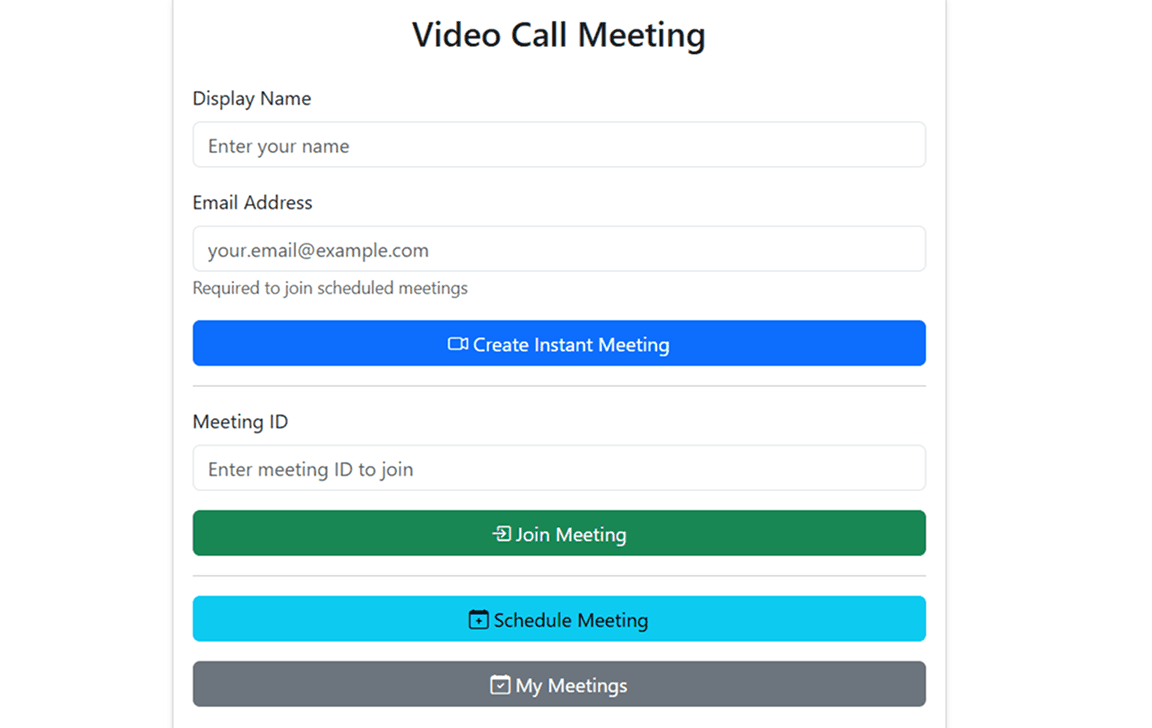
Video Call Meeting Platform – WebRTC-Based Conferencing System
A comprehensive video conferencing platform with WebRTC, real-time chat, screen sharing, waiting room, and automated email scheduling built from scratch.
Project Overview
The Video Call Meeting Platform is a full-stack WebRTC-based video conferencing application that enables real-time multi-participant communication. The project was built to understand the intricacies of peer-to-peer video streaming, signaling servers, and real-time event management in a production-grade application.
Unlike using pre-built SDKs, this project implements WebRTC from scratch, handling offer-answer negotiation, ICE candidate exchange, and media stream management manually. The platform includes advanced features like waiting rooms, role-based permissions, screen sharing, real-time chat, and automated email notifications with calendar invites.
The system is designed for scalability, supporting multiple concurrent meetings with dynamic participant management, persistent storage in MongoDB, and scheduled reminder services using cron jobs.
Tech Stack: Node.js, Express, Socket.io, WebRTC, MongoDB, Nodemailer, Bootstrap 5
Repository: GitHub Link
Core Features
Real-Time Video Conferencing
The platform uses WebRTC for peer-to-peer video and audio streaming. Each participant establishes direct connections with others in the meeting, enabling low-latency communication. The system handles:
- Peer-to-Peer Connections: Direct media streaming between participants using WebRTC data channels
- Dynamic Video Grid: Responsive layout that adapts to the number of active participants
- Media Controls: Toggle camera and microphone in real-time with synchronized state updates
- Screen Sharing: Share entire screen or specific application windows with all participants
- Connection Quality Management: Handle network interruptions and automatic reconnection
Meeting Management
The application supports both instant meetings and scheduled meetings:
Instant Meetings:
- Create meetings on-the-fly with auto-generated meeting IDs
- Share meeting links or IDs instantly
- No prior setup required
Scheduled Meetings:
- Plan meetings in advance with specific date, time, and duration
- Send automated email invitations to participants with calendar attachments (iCal format)
- Set up waiting rooms, default permissions, and reminder settings
- Track meeting status through scheduled, ongoing, completed, and cancelled states
Participant & Access Control
The platform implements a sophisticated role-based permission system:
Roles:
- Admin (Host): Full control over meeting settings, participants, and permissions
- Co-Host: Elevated permissions including participant removal and permission management
- Participant: Standard user with configurable audio, video, and screen share permissions
Waiting Room:
- Optional security layer requiring host approval before joining
- Admit or deny participants individually
- Real-time waiting room counter and notifications
Permission Management:
- Granular control over audio, video, and screen sharing capabilities
- Set default permissions for new participants
- Apply bulk permission updates to all participants
- Individual permission overrides
Communication Features
Real-Time Chat:
- Text messaging with all participants during active meetings
- Chat history preserved throughout the session
- Unread message badges and notifications
Raise Hand:
- Participants can signal the host for attention
- Visual indicator for raised hands
- Hosts can lower hands manually
Screen Sharing:
- Share entire screen or specific windows
- Visual indicator showing who is sharing
- Permission-based access control
Email & Notification System
Built with Nodemailer, the platform automates meeting communication:
Automated Emails:
- Meeting invitations with iCal calendar attachments
- Schedule confirmations for hosts
- 15-minute reminder emails before meeting start (using node-cron)
- Cancellation notifications to all participants
Calendar Integration:
- iCal format compatible with Google Calendar, Outlook, Apple Calendar
- One-click "Add to Calendar" from email invites
- Automatic timezone handling
Technical Architecture
Backend Infrastructure
Node.js + Express:
- RESTful API for meeting CRUD operations
- SSL/TLS support for secure HTTPS connections
- Environment-based configuration with dotenv
Socket.io:
- WebSocket-based bidirectional real-time communication
- Custom event handlers for signaling, chat, and participant management
- Connection authentication and validation
MongoDB + Mongoose:
- Persistent storage for meeting records and history
- Schema validation and data modeling
- Meeting status tracking and participant logs
WebRTC Implementation
The signaling process uses Socket.io to exchange WebRTC offer-answer messages and ICE candidates:
- Offer Creation: Participant A creates an SDP offer and sends it via signaling server
- Answer Response: Participant B receives the offer, creates an answer, and sends it back
- ICE Candidate Exchange: Both participants exchange ICE candidates for NAT traversal
- Media Stream Establishment: Direct peer-to-peer connection established for audio/video
This manual implementation provided deep insight into WebRTC internals, debugging connection issues, and optimizing media quality.
Real-Time Event Handling
Client to Server Events:
createMeeting,joinMeeting,leaveMeetingnewOffer,newAnswer,sendIceCandidateToSignalingServerchatMessage,mediaStateChangedraiseHand,admitFromWaitingRoom,denyFromWaitingRoommakeCoHost,removeParticipant,updateUserPermissions
Server to Client Events:
meetingJoined,waitingRoomJoined,admittedToMeetingnewParticipant,participantLeft,participantsUpdatechatMessage,mediaStateChangedpromotedToCoHost,permissionsUpdated,removedFromMeeting
Database Schema
Meeting Model:
{
  meetingId: String (unique),
  title: String,
  hostEmail: String,
  scheduledTime: Date,
  duration: Number,
  status: Enum (scheduled, ongoing, completed, cancelled),
  participants: [{ email, name, role }],
  settings: { waitingRoomEnabled, emailReminders, defaultPermissions }
}
Meeting History Model:
{
  meetingId: String,
  startTime: Date,
  endTime: Date,
  participants: [{ email, name, joinTime, leaveTime }],
  duration: Number
}
API Documentation
REST Endpoints
Schedule Meeting:
POST /api/meetings/schedule
Content-Type: application/json

{
  "title": "Team Standup",
  "hostEmail": "host@example.com",
  "scheduledTime": "2025-10-27T10:00:00Z",
  "duration": 30,
  "participants": [{ "email": "user@example.com", "name": "User" }],
  "settings": { "waitingRoomEnabled": true }
}
Get User Meetings:
GET /api/meetings/user/:emailCancel Meeting:
DELETE /api/meetings/:meetingIdStart/End Meeting:
PATCH /api/meetings/:meetingId/start
PATCH /api/meetings/:meetingId/end
Development Challenges
WebRTC Complexity
Implementing WebRTC manually rather than using a SDK required understanding SDP negotiation, ICE candidate gathering, and STUN/TURN server configuration. Debugging connection failures between peers across different networks taught me about NAT traversal and firewall issues.
State Synchronization
Keeping participant states (audio, video, hand raised) synchronized across all clients required careful Socket.io event management. Race conditions and network delays needed special handling to ensure UI consistency.
SSL/TLS Requirement
WebRTC requires HTTPS for getUserMedia API access. Setting up local SSL certificates with mkcert and configuring HTTPS in Node.js was essential for development.
Email Delivery
Integrating Gmail SMTP with Nodemailer required generating app-specific passwords and handling email rate limits. Calendar invite generation using iCal format needed precise formatting to ensure compatibility across calendar applications.
Project Structure
connect/
├── backend/
│   ├── server.js                 # Main server with Socket.io
│   ├── controllers/
│   │   └── meetingController.js  # Meeting CRUD logic
│   ├── routes/
│   │   └── meetingRoutes.js      # API routes
│   ├── socket/
│   │   ├── socketEvents.js       # Event handlers
│   │   └── socketHandlers/
│   │       ├── adminHandlers.js
│   │       ├── chatMediaHandlers.js
│   │       ├── waitingRoomHandlers.js
│   │       └── webrtcHandlers.js
│   └── utils/
│       ├── emailService.js       # Nodemailer integration
│       └── reminderService.js    # Cron job scheduler
├── database/
│   ├── config/database.js        # MongoDB config
│   └── models/
│       ├── Meeting.js
│       └── MeetingHistory.js
├── frontend/
│   ├── index.html
│   ├── css/styles.css
│   └── js/
│       ├── scripts.js
│       ├── scheduleMeeting.js
│       └── socketListeners.js
└── package.json
Installation & Setup
Prerequisites
- Node.js (v14+)
- MongoDB (local or Atlas)
- Gmail account for email notifications
Steps
-
Clone the repository:
git clone https://github.com/gourisinghrawat/video-call-meeting.git cd video-call-meeting -
Install dependencies:
npm install -
Generate SSL certificates:
npx mkcert create-ca npx mkcert create-cert -
Configure environment variables in
.env:MONGODB_URI=mongodb://localhost:27017/videocall APP_URL=https://localhost:8181 EMAIL_USER=your-email@gmail.com EMAIL_APP_PASSWORD=your-app-password ENABLE_EMAILS=true PORT=8181 -
Start the server:
npm start -
Access at
https://localhost:8181
Future Enhancements
Recording & Transcription
- Implement server-side meeting recording using MediaRecorder API
- Add AI-powered transcription with speaker detection
- Generate meeting summaries and action items
Advanced Analytics
- Track participant engagement metrics
- Generate meeting quality reports
- Monitor connection quality and bandwidth usage
Breakout Rooms
- Split meetings into smaller groups
- Host can move between rooms
- Automatic timer and room merging
Virtual Backgrounds
- AI-powered background replacement
- Custom image uploads
- Blur background option
Mobile Application
- React Native mobile app
- Native mobile optimization
- Push notifications for meeting reminders
Conclusion
Building this video conferencing platform from scratch provided hands-on experience with WebRTC, real-time communication protocols, and full-stack development. The project demonstrates understanding of peer-to-peer networking, state management, email automation, and scalable backend architecture.
The platform is production-ready with features comparable to commercial solutions, showcasing the ability to build complex real-time applications independently. This project serves as a strong foundation for understanding modern web communication technologies and can be extended further into enterprise-grade conferencing solutions.
GitHub Repository: Video Call Meeting Platform